


Google Contacts
OAuth 2.0 productivityGoogle Contacts
What you can do
Section titled “What you can do”Connect this agent connector to let your agent:
- Manage contacts — create, read, update, and delete contacts; batch create, update, and delete up to 200–500 contacts in a single request
- Search contacts — search across names, emails, and phone numbers in the main contacts list or “Other contacts”
- Handle contact groups — create, update, delete, and modify membership of contact groups
- Work with other contacts — list and search auto-generated contacts from email history, and copy them into the main contacts list
- Access directory — list and search people in a Google Workspace domain directory (requires Workspace account)
- Manage photos — upload or remove contact profile photos
Authentication
Section titled “Authentication”This connector uses OAuth 2.0. Scalekit acts as the OAuth client: it redirects your user to Google, obtains an access token, and automatically refreshes it before it expires. Your agent code never handles tokens directly — you only pass a connectionName and a user identifier.
You supply your Google OAuth app credentials (Client ID + Secret) once per environment in the Scalekit dashboard.
Set up the connector
Register your Scalekit environment with the Google Contacts connector so Scalekit handles the OAuth 2.0 flow and token lifecycle for you. The connection name you create is used to identify and invoke the connection in your code.
-
Set up auth redirects
-
In Scalekit dashboard, go to AgentKit > Connections > Create Connection. Find Google Contacts and click Create. Click Use your own credentials and copy the redirect URI — it looks like
https://<SCALEKIT_ENVIRONMENT_URL>/sso/v1/oauth/<CONNECTION_ID>/callback.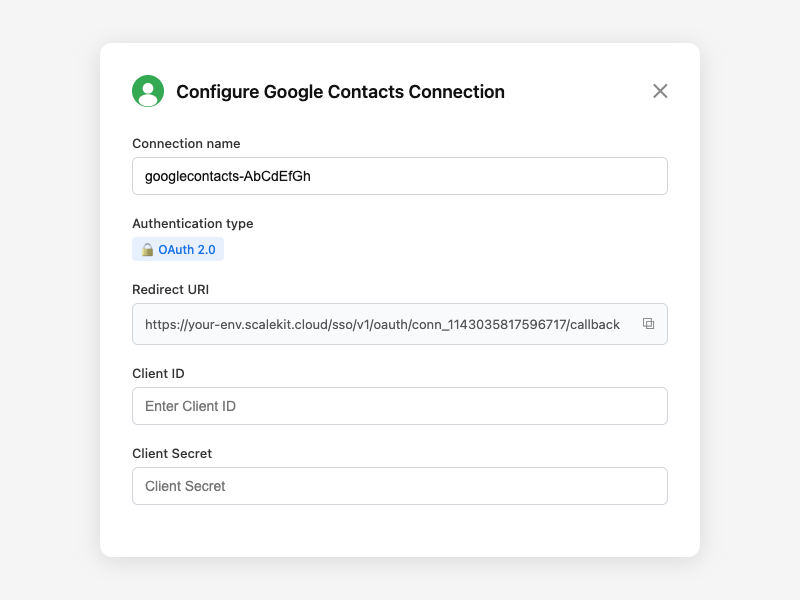
-
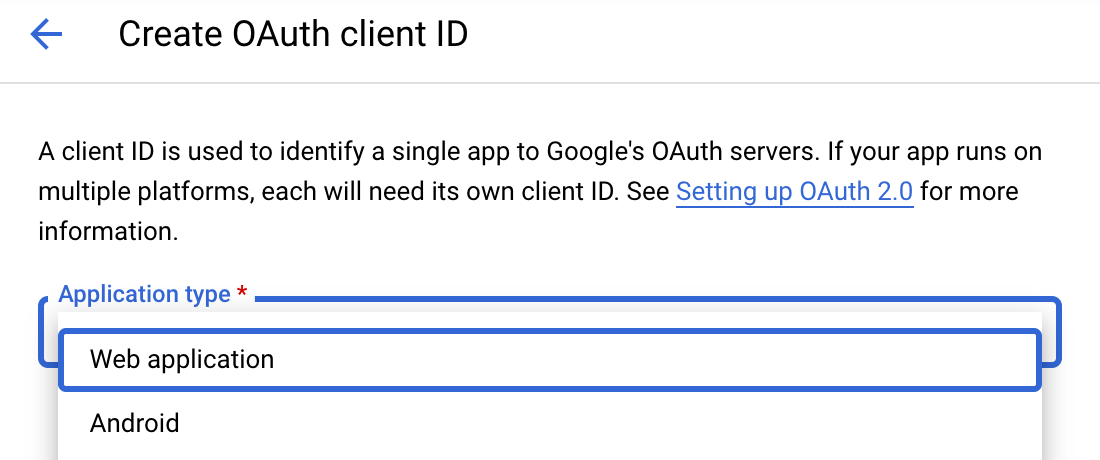
Navigate to Google Cloud Console → APIs & Services → Credentials. Select + Create Credentials, then OAuth client ID. Choose Web application from the Application type menu.
-
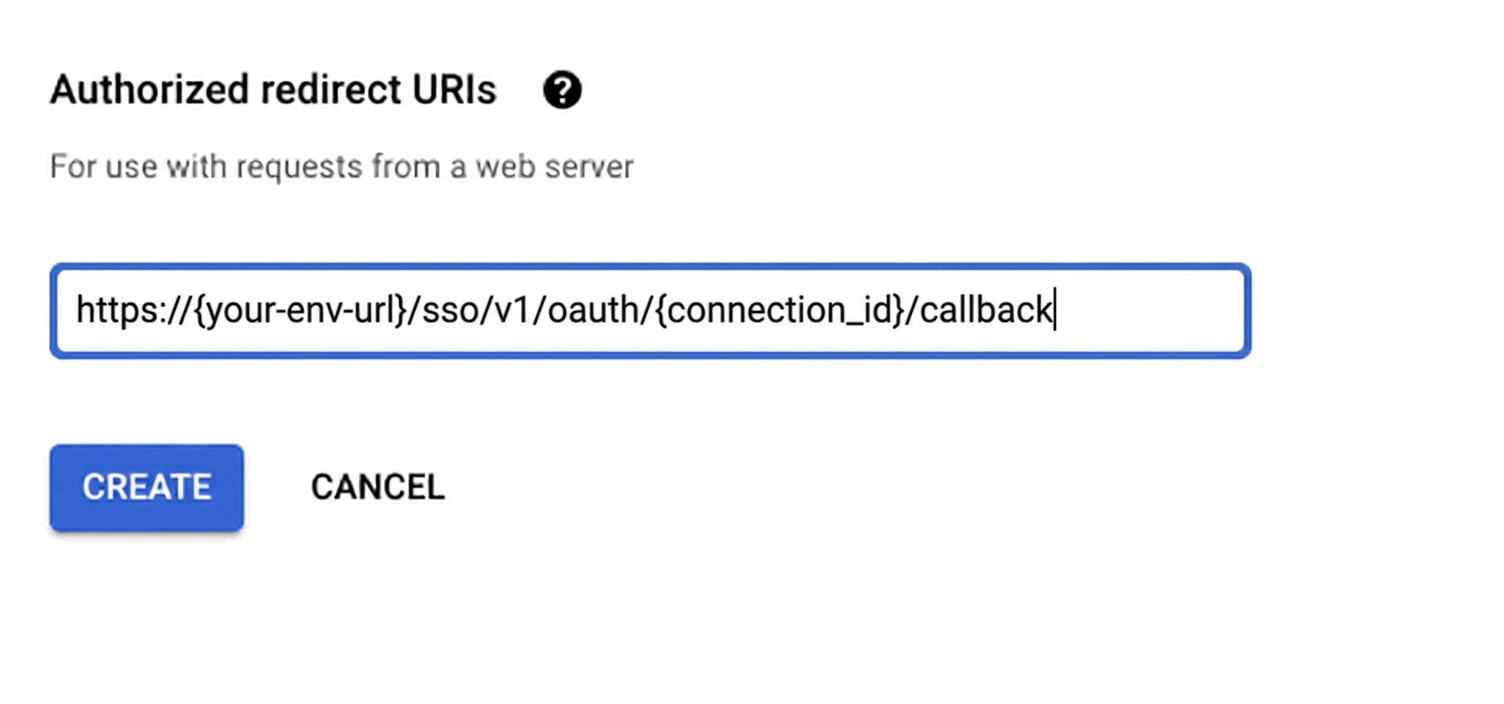
Under Authorized redirect URIs, click + Add URI, paste the redirect URI, and click Create.
-
-
Enable the People API
-
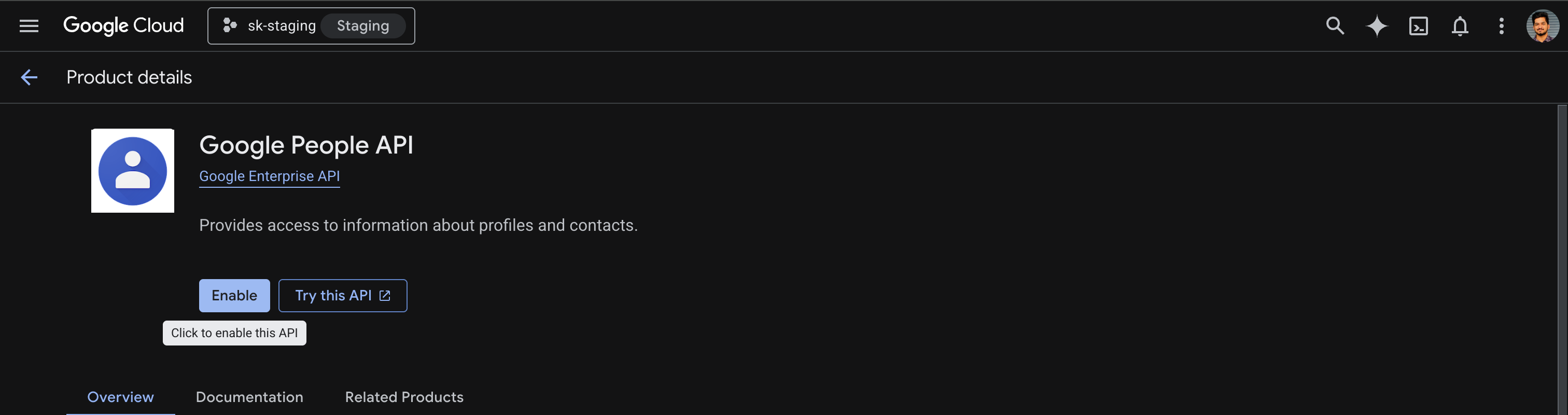
In Google Cloud Console, go to APIs & Services → Library. Search for People API and click Enable.
-
-
Get client credentials
- Google provides your Client ID and Client Secret after you create the OAuth client ID in step 1. Copy both values from the credentials detail panel.
-
Add credentials in Scalekit
-
In Scalekit dashboard, go to AgentKit > Connections and open the connection you created.
-
Enter your Google Client ID and Client Secret, then click Save.
-
-
Connect a user account
Your users must authorize access to their Google Contacts. Generate an authorization link and direct them through the OAuth flow.
Via dashboard (for testing)
- Open the connection and click the Connected Accounts tab → Add Account.
- Fill in Your User’s ID (e.g.
user_123) and follow the Google OAuth prompt.
Via API (for production)
const { link } = await scalekit.actions.getAuthorizationLink({connectionName: 'googlecontacts',identifier: 'user_123',});// Redirect your user to `link` — they complete OAuth on Google's sideconsole.log('Authorize Google Contacts:', link);link_response = scalekit_client.actions.get_authorization_link(connection_name="googlecontacts",identifier="user_123")# Redirect your user to link_response.linkprint("Authorize Google Contacts:", link_response.link)
Code examples
Once a connected account is set up, make API calls through the Scalekit proxy or call Google Contacts tools directly via execute_tool.
Proxy API calls
import { ScalekitClient } from '@scalekit-sdk/node';
const scalekit = new ScalekitClient( process.env.SCALEKIT_ENV_URL, process.env.SCALEKIT_CLIENT_ID, process.env.SCALEKIT_CLIENT_SECRET);const actions = scalekit.actions;
// List contactsconst result = await actions.request({ connectionName: 'googlecontacts', identifier: 'user_123', path: '/v1/people/me/connections', method: 'GET', query: { personFields: 'names,emailAddresses,phoneNumbers' },});console.log(result);import scalekit.client, osfrom dotenv import load_dotenvload_dotenv()
scalekit_client = scalekit.client.ScalekitClient( client_id=os.getenv("SCALEKIT_CLIENT_ID"), client_secret=os.getenv("SCALEKIT_CLIENT_SECRET"), env_url=os.getenv("SCALEKIT_ENV_URL"),)actions = scalekit_client.actions
# List contactsresult = actions.request( connection_name="googlecontacts", identifier="user_123", path="/v1/people/me/connections", method="GET", query={"personFields": "names,emailAddresses,phoneNumbers"},)print(result)Execute tools
Use execute_tool to call Google Contacts tools directly from your agent.
List contacts
connected_account = scalekit_client.connect.get_or_create_connected_account( connection_name="googlecontacts", identifier="user_123").connected_account
contacts = actions.execute_tool( tool_name="googlecontacts_contacts_list", connected_account_id=connected_account.id, tool_input={ "person_fields": "names,emailAddresses,phoneNumbers", "page_size": 10, })Create a contact
new_contact = actions.execute_tool( tool_name="googlecontacts_contact_create", connected_account_id=connected_account.id, tool_input={ "given_name": "Jane", "family_name": "Doe", "email": "jane.doe@example.com", "phone": "+1234567890", "person_fields": "names,emailAddresses,phoneNumbers", })person_id = new_contact["resourceName"].split("/")[1]Search contacts
results = actions.execute_tool( tool_name="googlecontacts_contacts_search", connected_account_id=connected_account.id, tool_input={ "query": "Jane", "read_mask": "names,emailAddresses", })Create a group and add a member
group = actions.execute_tool( tool_name="googlecontacts_group_create", connected_account_id=connected_account.id, tool_input={"name": "VIP Customers"})group_id = group["resourceName"].split("/")[1]
actions.execute_tool( tool_name="googlecontacts_group_members_modify", connected_account_id=connected_account.id, tool_input={ "group_id": group_id, "resource_names_to_add": [f"people/{person_id}"], })Update a contact
googlecontacts_contact_update and googlecontacts_group_update require a current etag. Google uses the etag as optimistic concurrency control — if the resource was modified since you last read it, the update is rejected to prevent silent overwrites.
In agentic workflows, your agent will typically call googlecontacts_contact_get first to read the current state of the contact, and the etag from that response is passed directly into the update call.
# 1. Get contact — etag is included in the responsecontact = actions.execute_tool( tool_name="googlecontacts_contact_get", connected_account_id=connected_account.id, tool_input={ "person_id": "c8901234567", "person_fields": "names,emailAddresses", })
# 2. Pass the etag from the get response into the updateactions.execute_tool( tool_name="googlecontacts_contact_update", connected_account_id=connected_account.id, tool_input={ "person_id": "c8901234567", "etag": contact["etag"], "update_person_fields": "names", "given_name": "Jane", "family_name": "Smith", })Getting resource IDs
Section titled “Getting resource IDs”Most tools require IDs that must be fetched from the API — never guess or hard-code them.
| Resource | Tool to get ID | Field in response |
|---|---|---|
| Person ID | googlecontacts_contacts_list | connections[].resourceName (part after people/) |
| Contact etag | googlecontacts_contact_get | etag |
| Group ID | googlecontacts_groups_list | contactGroups[].resourceName (part after contactGroups/) |
| Group etag | googlecontacts_group_get | etag |
| Other contact person ID | googlecontacts_other_contacts_list | otherContacts[].resourceName (part after people/) |
Tool list
Section titled “Tool list” googlecontacts_contacts_list List all contacts in the authenticated user's Google Contacts account with optional filtering and pagination. 5 params
List all contacts in the authenticated user's Google Contacts account with optional filtering and pagination.
person_fields string required Comma-separated fields to return (e.g. names,emailAddresses,phoneNumbers,organizations) page_size integer optional Maximum number of contacts to return (default 100, max 1000) page_token string optional Token for fetching the next page of results sort_order string optional Sort order: LAST_MODIFIED_ASCENDING or LAST_MODIFIED_DESCENDING sync_token string optional Sync token from a previous response for incremental sync googlecontacts_contact_get Retrieve a single contact by their resource name (person ID). 2 params
Retrieve a single contact by their resource name (person ID).
person_id string required The person ID (part after "people/"). Get from googlecontacts_contacts_list. person_fields string required Comma-separated fields to return (e.g. names,emailAddresses,phoneNumbers) googlecontacts_contact_create Create a new contact in the authenticated user's Google Contacts account. 10 params
Create a new contact in the authenticated user's Google Contacts account.
person_fields string required Fields to return in the response (e.g. names,emailAddresses) given_name string optional Contact's first name family_name string optional Contact's last name email string optional Contact's email address email_type string optional Email type: home, work, other phone string optional Contact's phone number phone_type string optional Phone type: home, work, mobile, other organization string optional Contact's organization/company name job_title string optional Contact's job title notes string optional Freeform notes about the contact googlecontacts_contact_update Update an existing contact. Requires the contact's etag for optimistic locking. 13 params
Update an existing contact. Requires the contact's etag for optimistic locking.
person_id string required The person ID. Get from googlecontacts_contacts_list. update_person_fields string required Comma-separated fields to update (e.g. names,emailAddresses,phoneNumbers) etag string optional Current etag for optimistic concurrency. Get from googlecontacts_contact_get. given_name string optional Updated first name family_name string optional Updated last name email string optional Updated email address email_type string optional Email type: home, work, other phone string optional Updated phone number phone_type string optional Phone type: home, work, mobile, other organization string optional Updated organization name job_title string optional Updated job title notes string optional Updated notes person_fields string optional Fields to return in the response googlecontacts_contact_delete Permanently delete a contact from Google Contacts. 1 param
Permanently delete a contact from Google Contacts.
person_id string required The person ID to delete. Get from googlecontacts_contacts_list. googlecontacts_contacts_search Search contacts by name, email, phone number, or other fields. 3 params
Search contacts by name, email, phone number, or other fields.
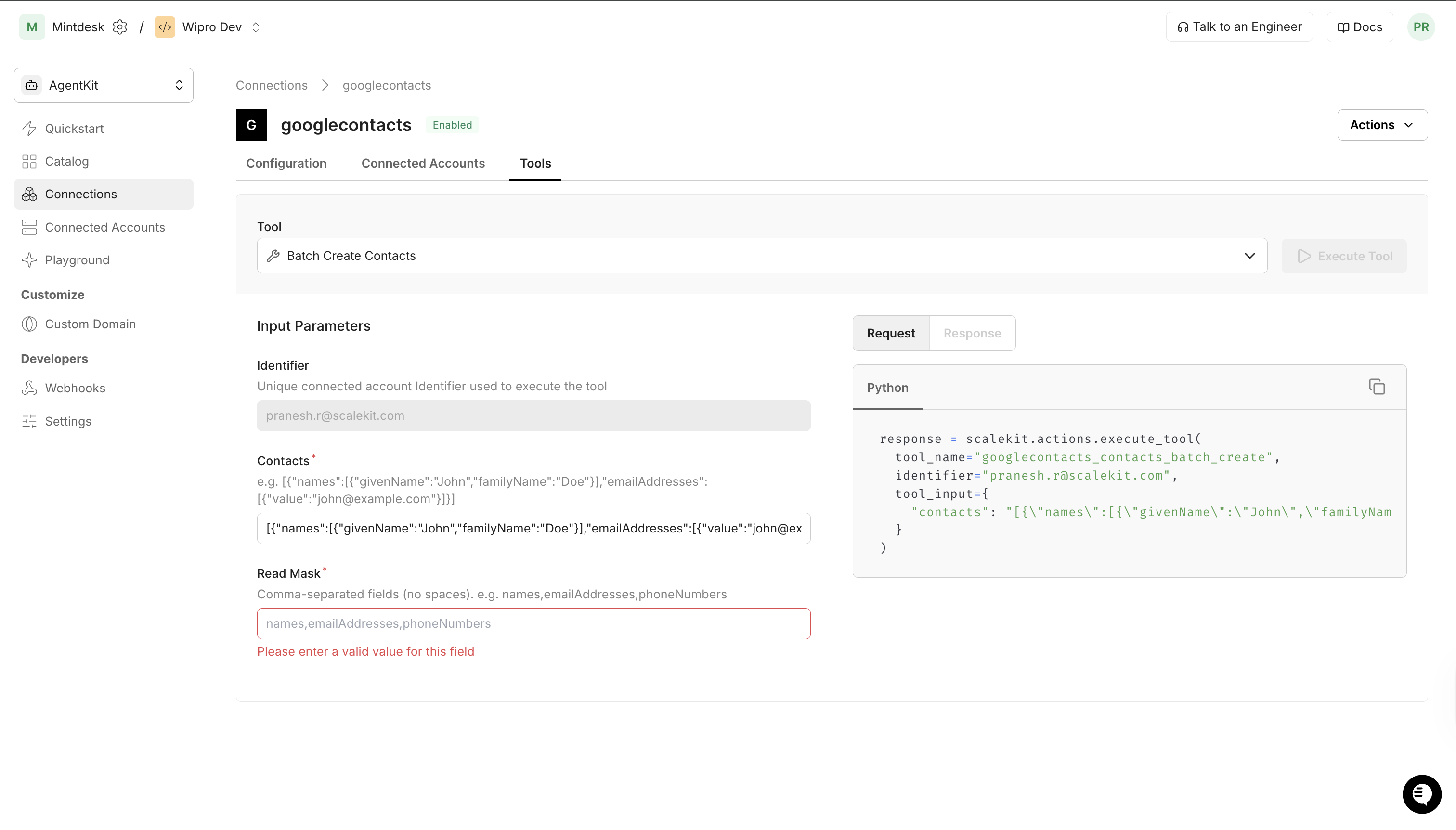
query string required Search query string read_mask string required Comma-separated fields to return (e.g. names,emailAddresses) page_size integer optional Maximum number of results (max 30) googlecontacts_contacts_batch_create Create up to 200 new contacts in a single request. 2 params
Create up to 200 new contacts in a single request.
contacts string required JSON-encoded array of contact person objects, each with a "names" array. E.g. `[{"names":[{"givenName":"Jane","familyName":"Doe"}]}]` read_mask string required Fields to return for each created contact (e.g. names,emailAddresses) googlecontacts_contacts_batch_update Update up to 200 contacts in a single request. 3 params
Update up to 200 contacts in a single request.
contacts string required JSON-encoded object map of `{resourceName: {etag, names, ...}}`. Keys are full resource names like "people/c123". update_mask string required Comma-separated fields to update (e.g. names,emailAddresses) read_mask string required Fields to return for each updated contact googlecontacts_contacts_batch_delete Permanently delete up to 500 contacts in a single request. 1 param
Permanently delete up to 500 contacts in a single request.
resource_names string required A contact resource name to delete in the format "people/<id>". Get from googlecontacts_contacts_list. googlecontacts_contact_update_photo Upload or replace a contact's profile photo. 3 params
Upload or replace a contact's profile photo.
person_id string required The person ID. Get from googlecontacts_contacts_list. photo_bytes string required Base64-encoded image data for the profile photo person_fields string optional Fields to return in the response googlecontacts_contact_delete_photo Remove a contact's profile photo. 2 params
Remove a contact's profile photo.
person_id string required The person ID. Get from googlecontacts_contacts_list. person_fields string optional Fields to return in the response googlecontacts_groups_list List all contact groups (both user-created and system groups) in the account. 4 params
List all contact groups (both user-created and system groups) in the account.
page_size integer optional Maximum number of groups to return page_token string optional Token for the next page of results group_fields string optional Fields to return for each group (e.g. name,memberCount,groupType) sync_token string optional Sync token for incremental sync googlecontacts_group_get Retrieve a single contact group by its ID. 3 params
Retrieve a single contact group by its ID.
group_id string required The contact group ID (part after "contactGroups/"). Get from googlecontacts_groups_list. group_fields string optional Fields to return for the group max_members integer optional Maximum number of member resource names to return googlecontacts_group_create Create a new contact group. 2 params
Create a new contact group.
name string required Display name for the new group read_group_fields string optional Fields to return in the response googlecontacts_group_update Update a contact group's name. 5 params
Update a contact group's name.
group_id string required The contact group ID. Get from googlecontacts_groups_list. name string required New display name for the group etag string optional Current etag for optimistic concurrency. Get from googlecontacts_group_get. update_group_fields string optional Fields to update read_group_fields string optional Fields to return in the response googlecontacts_group_delete Delete a contact group. System groups (myContacts, starred, etc.) cannot be deleted. 2 params
Delete a contact group. System groups (myContacts, starred, etc.) cannot be deleted.
group_id string required The contact group ID. Get from googlecontacts_groups_list. delete_contacts boolean optional If true, also delete all contacts in the group googlecontacts_group_members_modify Add or remove contacts from a contact group. 3 params
Add or remove contacts from a contact group.
group_id string required The contact group ID. Get from googlecontacts_groups_list. resource_names_to_add array optional Array of contact resource names to add (e.g. ["people/c123"]) resource_names_to_remove array optional Array of contact resource names to remove googlecontacts_groups_batch_get Retrieve a contact group by its resource name. 3 params
Retrieve a contact group by its resource name.
resource_names string required A contact group resource name in the format "contactGroups/<id>" (e.g. contactGroups/myContacts). Get from googlecontacts_groups_list. group_fields string optional Fields to return for the group max_members integer optional Maximum number of group members to return googlecontacts_people_batch_get Retrieve a contact by their resource name. 2 params
Retrieve a contact by their resource name.
resource_names string required A contact resource name in the format "people/<id>" (e.g. people/c123456789). Get from googlecontacts_contacts_list. person_fields string required Comma-separated fields to return (e.g. names,emailAddresses,phoneNumbers) googlecontacts_other_contacts_list List contacts in the "Other contacts" section — contacts auto-generated from email history that the user hasn't explicitly added. 4 params
List contacts in the "Other contacts" section — contacts auto-generated from email history that the user hasn't explicitly added.
read_mask string required Fields to return (e.g. names,emailAddresses,phoneNumbers) page_size integer optional Maximum number of contacts to return page_token string optional Token for the next page sync_token string optional Sync token for incremental sync googlecontacts_other_contacts_search Search contacts in the "Other contacts" section. 3 params
Search contacts in the "Other contacts" section.
query string required Search query string read_mask string required Fields to return (e.g. names,emailAddresses) page_size integer optional Maximum number of results (max 30) googlecontacts_other_contact_copy Copy an "Other contact" to the user's main contacts list. 3 params
Copy an "Other contact" to the user's main contacts list.
person_id string required The person ID of the other contact. Get from googlecontacts_other_contacts_list. copy_mask string required Fields to copy (e.g. names,emailAddresses,phoneNumbers) read_mask string optional Fields to return in the created contact googlecontacts_directory_list List people in the Google Workspace domain directory. Requires a Google Workspace account. 5 params
List people in the Google Workspace domain directory. Requires a Google Workspace account.
read_mask string required Fields to return (e.g. names,emailAddresses,phoneNumbers) sources string required Directory source type: DIRECTORY_SOURCE_TYPE_DOMAIN_CONTACT or DIRECTORY_SOURCE_TYPE_DOMAIN_PROFILE page_size integer optional Maximum number of people to return page_token string optional Token for the next page sync_token string optional Sync token for incremental sync googlecontacts_directory_search Search people in the Google Workspace domain directory. Requires a Google Workspace account. 5 params
Search people in the Google Workspace domain directory. Requires a Google Workspace account.
query string required Search query string read_mask string required Fields to return (e.g. names,emailAddresses) sources string required Directory source: DIRECTORY_SOURCE_TYPE_DOMAIN_CONTACT or DIRECTORY_SOURCE_TYPE_DOMAIN_PROFILE page_size integer optional Maximum number of results page_token string optional Token for the next page